
Are you curious about how your Gear S3 can help you understand your sleep better? Tracking your sleep isn’t just about knowing how many hours you rest—it’s about uncovering the quality of your sleep and how it affects your energy, mood, and health.
Your Gear S3 uses smart technology to monitor your sleep patterns effortlessly while you rest. Keep reading to discover exactly how it works and how this insight can transform the way you recharge every night.
Gear S3 Sleep Tracking Features
The Gear S3 offers a range of sleep tracking features designed to give you clear insights into your nightly rest. Understanding how it monitors your sleep can help you make better decisions about your bedtime habits. Let’s look closer at what this smartwatch uses to track sleep and the kind of data it records for you.
Sensors Used For Monitoring
The Gear S3 uses a combination of sensors to keep an eye on your sleep patterns. It mainly relies on an accelerometer to detect your movements throughout the night. If you toss and turn, the watch picks up on this activity to differentiate between awake and sleep periods.
Additionally, the heart rate sensor plays a key role by measuring your pulse rate while you sleep. Changes in heart rate help the device estimate the different stages of sleep you go through. These sensors work together quietly on your wrist, gathering data without disturbing your rest.
Types Of Sleep Data Recorded
The Gear S3 doesn’t just tell you how long you slept; it breaks down your sleep into meaningful categories. It tracks light sleep, deep sleep, and REM sleep, giving you a detailed look at the quality of your rest. This breakdown helps you understand if you’re getting enough restorative sleep stages.
Moreover, the watch records total sleep time and interruptions during the night. You get notifications if your sleep was restless or if you woke up frequently. This information can guide you to adjust your bedtime routine for better sleep quality.
- Total Sleep Duration:Measures how many hours you slept.
- Sleep Stages:Tracks light, deep, and REM sleep phases.
- Awakenings:Counts how many times you woke up.
- Heart Rate Data:Monitors pulse changes during sleep.
Have you ever wondered if your restless nights are affecting your daily energy? Using these insights, you can experiment with changes and see how your sleep patterns respond. The Gear S3 makes this process simple and actionable.
How Sleep Detection Works
Understanding how the Gear S3 tracks your sleep can help you make the most of its features. The device uses a combination of sensors and smart algorithms to monitor your nighttime rest without needing any extra devices. This means it quietly gathers data while you sleep, giving you detailed insights by morning.
Motion And Heart Rate Analysis
The Gear S3 relies heavily on motion detection to understand when you fall asleep and wake up. Its built-in accelerometer tracks subtle movements, like tossing and turning, to determine if you’re awake or asleep. At the same time, the heart rate sensor measures changes in your pulse, which naturally slow down when you enter deeper sleep phases.
This dual approach allows the watch to distinguish between light movements during sleep and actual wakefulness. Have you noticed how your pulse feels slower when you’re truly resting? The Gear S3 uses this exact principle to fine-tune its sleep tracking accuracy.
Sleep Stage Identification
Once the Gear S3 collects your motion and heart rate data, it categorizes your sleep into different stages: light, deep, and REM sleep. Each stage has unique characteristics that affect your body differently, and the watch’s algorithms identify these by analyzing patterns in your movement and heart rate.
Knowing your time spent in each stage can reveal if you’re getting quality rest or just spending time in lighter sleep phases. This insight helps you understand how refreshed you might feel the next day. Have you ever wondered why you sometimes wake up feeling tired despite sleeping for hours? The Gear S3 can help you find the answer.
Accuracy Of Gear S3 Sleep Tracking
The Gear S3 offers a reliable way to track sleep patterns. Users often wonder about its accuracy. Understanding this can help make informed decisions about sleep health.
Factors Influencing Accuracy
Several factors impact how accurately the Gear S3 tracks sleep. Wrist placement is crucial. Ensure the device is snug but comfortable. This ensures better sensor contact. Movement during sleep can also affect results. The Gear S3 uses accelerometers to detect motion. Less movement means better data accuracy. Environmental conditions play a role too. A quiet, dark room often results in more accurate readings.
Comparison With Other Devices
The Gear S3 competes with other sleep tracking devices. Fitbit and Apple Watch are popular comparisons. The Gear S3 offers comparable accuracy. It stands out with its intuitive interface. Some users find it more user-friendly. Battery life is another advantage. The Gear S3 often lasts longer between charges. This means consistent sleep tracking without nightly recharges.

Credit: upgrademystatus.com
Setting Up Sleep Tracking On Gear S3
Setting up sleep tracking on the Gear S3 helps monitor your rest effortlessly. The watch uses sensors to detect movements and heart rate changes during sleep. Activating sleep tracking prepares the device to gather accurate sleep data. Customizing settings tailors the experience to your sleep habits and preferences.
Enabling Sleep Mode
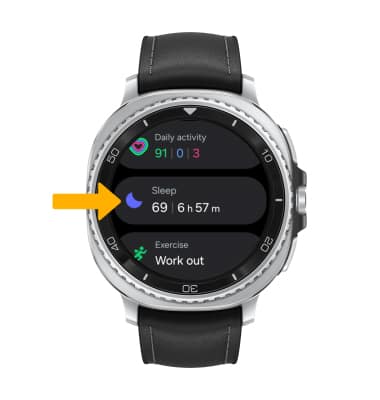
Start by opening the Gear S3’s main menu. Locate the “Samsung Health” app and tap to open it. Scroll to find the “Sleep” section. Activate sleep mode by toggling the switch on. The watch now tracks your sleep automatically while you rest.
Customizing Sleep Settings
Adjust sleep goals to match your ideal rest time. Set your preferred bedtime and wake-up time for better accuracy. Enable or disable sleep tracking notifications based on your needs. You can also choose to sync sleep data with your smartphone for detailed reports.
Interpreting Sleep Data
Interpreting sleep data from the Gear S3 helps you understand your rest quality. The watch collects detailed information throughout the night. This data reveals how well you sleep and highlights areas to improve. Reading and understanding these reports can guide better sleep habits.
Reading Sleep Reports
The Gear S3 provides clear sleep reports each morning. These reports show total sleep time and sleep stages. You see how long you were in light, deep, and REM sleep. The watch also notes when you were awake during the night.
The report uses simple graphs and numbers. It shows sleep duration with colored bars for each stage. You can quickly see if you had enough deep sleep. The data updates daily and improves with more nights tracked.
Identifying Sleep Patterns
Sleep patterns reveal your usual sleep habits over time. The Gear S3 tracks these trends across days and weeks. It highlights if your sleep time changes often or stays consistent.
Patterns help spot issues like waking up too early or restless nights. The watch may show if certain days have better or worse sleep. This information helps adjust routines to improve rest quality.
- Look for consistent sleep and wake times.
- Note how often you reach deep sleep stages.
- Check for frequent awakenings or short sleep cycles.
- Use trends to plan better bedtime habits.
Credit: www.sammobile.com
Tips For Better Sleep Monitoring
Accurate sleep tracking depends on a few key habits. These tips improve the Gear S3’s ability to monitor your rest. Small changes help the watch collect better data. You get clearer insights about your sleep patterns.
Wearing The Watch Properly
Wear the Gear S3 snugly on your wrist. It should not be too loose or tight. The sensor needs good skin contact to detect movement and heart rate. Place the watch slightly above your wrist bone for best results. Avoid wearing it over clothing or sweatbands during sleep.
Optimizing Sleep Environment
Keep your bedroom dark and quiet for better sleep quality. Lower the room temperature to around 65°F (18°C). Reduce noise by using earplugs or white noise machines. Avoid bright screens or strong lights before bed. A calm environment helps the Gear S3 track deep and light sleep stages more accurately.
Common Issues And Fixes
Many users face issues with the Gear S3 sleep tracking feature. Understanding common problems helps in fixing them quickly. This section covers frequent errors and simple solutions to keep your sleep data accurate.
Troubleshooting Sleep Tracking Errors
Sleep tracking may stop working or show wrong data. Poor sensor contact can cause this. Make sure the watch fits snugly on your wrist. Dirt or sweat on sensors can also block readings. Clean the sensors gently with a soft cloth.
Check if the sleep mode is activated in settings. Sometimes, the watch may not detect sleep if you move too much. Try to stay still when you sleep for better results. Restarting the watch can clear minor glitches affecting sleep tracking.
When To Reset Or Update Firmware
Firmware updates improve device performance and fix bugs. Check for updates regularly in the Samsung Wearable app. Outdated software can cause tracking errors or slow responses.
If problems continue after basic fixes, consider resetting the watch. Resetting restores default settings and clears corrupted data. Back up important information before resetting. After reset, re-pair the watch with your phone to sync data properly.
Using Third-party Apps With Gear S3
The Gear S3 offers basic sleep tracking on its own, but third-party apps expand its capabilities. These apps provide deeper insights and more detailed sleep data. They connect easily with the Gear S3, syncing information to your phone. Using third-party apps helps users better understand sleep patterns and improve rest quality.
Popular Sleep Tracking Apps
- Sleep as Android: Tracks sleep cycles and smart alarms.
- AutoSleep: Monitors sleep quality and duration automatically.
- Pillow: Offers detailed graphs and sleep stage analysis.
- Sleep Cycle: Detects movement and sounds to analyze sleep.
- Fitbit App: Works with Gear S3 to log sleep data.
Enhancing Data Accuracy
Third-party apps use the Gear S3 sensors to collect more precise sleep data. They combine heart rate, movement, and breathing patterns for better results. Custom settings allow users to adjust tracking based on personal habits. Regular updates improve app algorithms and accuracy over time. Syncing data with a smartphone helps keep sleep logs organized and accessible.
Credit: www.att.com
Frequently Asked Questions
How Does Gear S3 Monitor Sleep Patterns?
Gear S3 uses built-in sensors to track your movements and heart rate. It analyzes sleep stages like light, deep, and REM sleep. This data helps provide insights into your sleep quality and duration for better health management.
Can Gear S3 Detect Sleep Interruptions?
Yes, Gear S3 detects sleep interruptions by monitoring movement and heart rate changes. It identifies when you wake up or shift positions during sleep. This helps users understand sleep disturbances and improve sleep habits.
Does Gear S3 Provide Detailed Sleep Reports?
Gear S3 syncs sleep data with the Samsung Health app for detailed reports. It shows sleep duration, stages, and quality trends over time. These insights help users make informed decisions to improve their sleep.
Is Gear S3 Sleep Tracking Accurate?
Gear S3 offers reasonably accurate sleep tracking using motion and heart rate data. While not medical-grade, it provides reliable insights for everyday sleep monitoring. Accuracy improves with consistent wear and proper device fit.
Conclusion
The Gear S3 tracks your sleep by monitoring movement and heart rate. It helps you understand your sleep patterns each night. You can see when you fall asleep and when you wake up. The watch also shows how long you stay in deep sleep.
This information can help you improve your rest over time. Using the Gear S3 makes tracking sleep simple and clear. It fits well into your daily routine. Sleep better, feel better.

