Are you tired of fumbling through endless options before starting your next survival game? Imagine having a simple, easy way to pick the perfect kit every time you play.
Creating a kit selector can change how you approach survival games, giving you an edge right from the start. In this guide, you’ll discover clear, step-by-step methods to build your own kit selector that fits your style and boosts your chances of winning.
Keep reading, and you’ll learn how to make your gameplay smoother, faster, and much more fun.
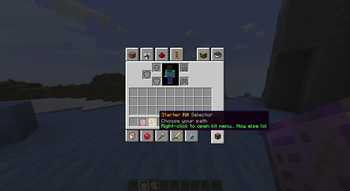
Credit: modrinth.com
Choosing The Right Game Engine
Choosing the right game engine is a crucial decision when creating a kit selector for survival games. The engine you pick affects not only how smooth your kit selector works but also how easy it is to customize and scale as your game grows. You want an engine that supports quick iteration and lets you focus on gameplay without getting bogged down in technical hurdles.
Popular Engines For Survival Games
Some game engines have become favorites among survival game developers because of their flexibility and community support.
- Unity:Known for its user-friendly interface and extensive asset store, Unity makes it easy to create UI elements like kit selectors.
- Unreal Engine:Offers powerful graphics capabilities and Blueprint visual scripting, which helps build interactive menus without heavy coding.
- Godot:Lightweight and open source, Godot is gaining popularity for its simplicity and straightforward scripting language.
Which engine feels right for your team’s skill level and project scope?
Engine Features For Kit Selectors
Your chosen engine should support dynamic UI creation and smooth interaction handling. Look for engines that offer built-in UI frameworks, drag-and-drop editors, and easy event handling.
- Customizability:Can you tweak the UI to fit your game’s style without writing tons of code?
- Integration:Does the engine allow seamless connection between the kit selector and player inventory or stats?
- Multiplayer Support:If your game is multiplayer, the engine should handle syncing kit choices across players reliably.
Ask yourself if the engine’s features align with how complex your kit selector needs to be.
Performance Considerations
Performance is vital, especially in survival games where quick decisions can mean life or death. Your kit selector should load instantly and not cause lag during gameplay.
- Resource Usage:Choose an engine that manages memory well, so your UI doesn’t slow down the game.
- Optimization Tools:Does the engine provide profiling and debugging tools to identify bottlenecks in your kit selector?
- Platform Targets:Will your engine handle all platforms you want to release on without sacrificing performance?
How much are you willing to compromise on visual flair for faster, smoother kit selection?
Designing Kit Options
Designing kit options is a key part of survival games. Kits shape how players experience the game. Thoughtful design helps keep gameplay fun and fair. It also supports different player styles and roles. Customizable elements add personal touch and strategy. Each kit should offer clear strengths and weaknesses.
Balancing Kits For Fair Play
Balance ensures no kit is too strong or weak. Fair kits create equal chances to win. Avoid overpowered weapons or tools in any kit. Test kits in different game scenarios. Adjust stats and items based on player feedback. Balance keeps the game competitive and fun for all.
Diverse Playstyles And Roles
Kits should support many ways to play. Include options for offense, defense, and support roles. Create kits for sneaky players and for direct combat. Diversity helps players find kits that match their style. It encourages teamwork and strategy in group play.
Customizable Kit Elements
Allow players to change parts of their kits. Options can include weapons, armor, and tools. Customization lets players adapt kits to their needs. It increases player engagement and satisfaction. Keep customization simple and easy to understand.
Building The User Interface
Building a user interface (UI) for a kit selector in survival games requires careful planning. The UI must be simple and clear. Players should find and choose kits quickly. The design should guide users without confusion. A clean and responsive interface improves the game experience. Focus on key elements that make navigation smooth and choices obvious.
Layout And Navigation
Arrange kit options in a grid or list for easy viewing. Group kits by type or role to help players find their favorites fast. Use clear labels and icons that represent each kit. Place navigation buttons where players expect them, like arrows or tabs. Keep the layout consistent across different screens. Make sure the interface fits well on all devices and screen sizes.
Visual Feedback And Animations
Provide instant feedback when a player selects a kit. Highlight the chosen kit with color changes or borders. Use simple animations to confirm actions, such as a quick bounce or fade. Avoid flashy effects that distract players. Subtle transitions make the UI feel smooth and alive. Feedback helps players understand their choices and actions clearly.
Accessibility Features
Design the UI to be usable by everyone, including those with disabilities. Use high-contrast colors for better visibility. Include text labels alongside icons for clarity. Allow keyboard navigation and screen reader support. Make buttons large enough for easy clicking. Test the UI with different accessibility tools to ensure it works well for all players.
Implementing Kit Selection Logic
Implementing kit selection logic is a key part of designing survival games that keep players engaged and give them a strategic edge. It’s not just about letting players pick their gear; it’s about ensuring the choice is smooth, responsive, and meaningful throughout the gameplay. Let’s break down how you can set up this logic effectively on the backend, manage player choices, and keep everything in sync with the gameplay experience.
Backend Setup And Data Management
Start by structuring your backend to store kit information clearly. Use a database or configuration files to define each kit’s attributes like weapons, armor, and special abilities.
Organize data with unique IDs for every kit to avoid confusion during retrieval. For example, a “Sniper” kit might have an ID like kit_001, while a “Medic” kit uses kit_002.
Keep your data flexible so you can add or update kits without breaking the system. This approach saves time during testing and lets you respond faster to player feedback.
Handling Player Choices
When a player selects a kit, immediately validate their choice against available options. Prevent errors by checking if the chosen kit exists and if the player is eligible to use it.
Store the player’s choice in a session or player profile for easy access during gameplay. This helps maintain consistency, especially if the player reconnects or switches game modes.
Consider adding UI feedback that confirms kit selection instantly. This small touch reduces confusion and enhances player confidence in their choice.
Syncing Kits With Gameplay
Make sure the selected kit loads correctly when the player enters the game world. This requires syncing the backend data with the game engine’s inventory system in real time.
Monitor the player’s status to update kit effects dynamically. For instance, if a kit grants faster health regeneration, your game should reflect that boost immediately.
Test different scenarios where kits interact with the environment or other players. This will help you catch bugs and balance issues early, improving the overall experience.
Testing And Debugging
Testing and debugging are vital steps in creating a kit selector for survival games. These processes help find errors and improve the overall player experience. Without proper testing, players may face bugs or confusing options. Debugging ensures that all features work as planned and that the kit selector runs smoothly.
Common Issues And Fixes
- Kit not loading:Check if the kit data is correctly linked to the selector.
- Selection not saving:Verify the save function and player data storage.
- UI glitches:Adjust layout settings and refresh UI elements after changes.
- Wrong kit assigned:Confirm the correct mapping between buttons and kits.
- Performance lag:Optimize code and reduce unnecessary processes in the selector.
Player Testing Strategies
Invite players to test the kit selector early. Observe how they interact with it. Note any confusion or errors they encounter. Ask players to try different kits and report issues. Use clear instructions to guide testers. Testing in different game environments can reveal hidden problems. Record feedback carefully for review.
Iterating Based On Feedback
Analyze the feedback from player tests. Identify common problems and areas for improvement. Make small changes and test again to see effects. Improve button responses and kit descriptions based on input. Focus on making the selector easy to use. Repeat this cycle until players find the selector intuitive and error-free.
Optimizing For Multiplayer
Optimizing a kit selector for multiplayer survival games requires careful attention to how players interact with the system simultaneously. You want every player to experience smooth, fair gameplay without delays or exploits that could ruin the fun. Balancing performance and security while handling multiple users is key to creating a satisfying multiplayer experience.
Server-client Communication
Efficient communication between the server and clients ensures that kit selections update instantly for every player. Use lightweight data packets to send only essential information, minimizing lag and bandwidth usage. For example, instead of sending full kit details repeatedly, send a unique kit ID and let the client handle local data.
Keep the communication flow secure by validating all kit selections on the server side before applying them. This prevents players from manipulating their kits through hacked clients or network sniffing. Have you tested how your server handles rapid kit changes from multiple players at once?
Preventing Exploits
Exploits can quickly ruin the balance of a survival game, especially in multiplayer. Lock down kit selection so players cannot pick kits they haven’t unlocked or mix abilities in unintended ways. Implement server-side checks to enforce restrictions strictly.
Consider adding cooldown timers after a kit switch to prevent spamming and potential abuse. Logging suspicious activity related to kit choices can help you spot exploit attempts early. What safeguards have you set up to catch and block cheats in your multiplayer environment?
Load Balancing And Scalability
As more players join, your kit selector system must handle the increased load without slowing down. Distribute the workload across servers or use cloud solutions to maintain fast response times. For instance, caching popular kits on each server node can reduce database queries.
Test how your system behaves under stress by simulating many simultaneous kit selections. If delays or failures occur, adjust resources or optimize code to improve performance. Are you prepared to scale your kit selector as your player base grows?
Enhancing Player Experience
Enhancing player experience is key to keeping survival games fun and engaging. A well-designed kit selector can make players feel more connected to the game. It helps players choose kits that suit their play style and encourages them to try new strategies. The right features make the game easier to learn and more rewarding to play.
Reward Systems And Progression
Reward systems motivate players to keep playing. They give a sense of achievement and growth. Design kits that players can unlock gradually. This creates a clear progression path and adds excitement.
- Offer simple rewards for early levels.
- Include rare kits as high-level rewards.
- Use points or currency earned in the game to unlock kits.
This system keeps players engaged and encourages repeated play. It makes the kit selector feel like a part of the game journey.
Visual Customizations
Visual options make the kit selector more appealing. Players love to personalize their characters. Add features to change colors, patterns, and gear styles. These options help players feel unique and creative.
- Allow color changes for armor and weapons.
- Include different skins or designs for kits.
- Show a preview so players see changes in real time.
Customizations boost player satisfaction and add a fun layer to the game. They also help players identify their kits easily during gameplay.
Integrating Tutorials
Tutorials guide players through the kit selector. Clear instructions help new players understand kit functions quickly. Use simple text and visuals to explain choices.
- Show key features of each kit.
- Explain how to use the selector step-by-step.
- Provide tips for selecting kits based on play style.
Good tutorials reduce confusion and improve player confidence. They make the kit selector easy and inviting for everyone.

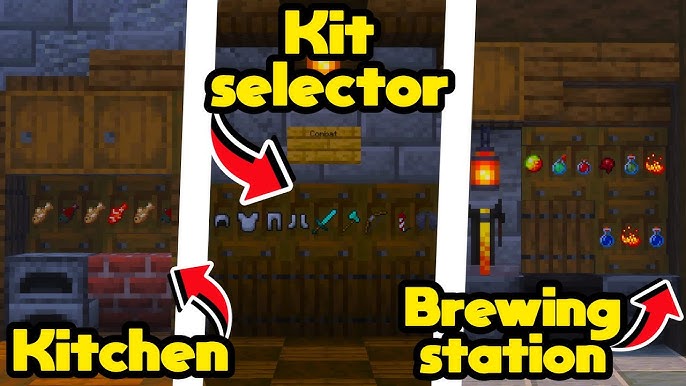
Credit: www.youtube.com

Credit: www.cubecraft.net
Frequently Asked Questions
What Is A Kit Selector In Survival Games?
A kit selector is a feature in survival games that allows players to choose a set of items or abilities before starting a game. It enhances gameplay by offering strategic options and customizing player experiences, making each round unique and tailored to individual play styles.
How Do Kit Selectors Enhance Gameplay?
Kit selectors enhance gameplay by providing strategic choices and customized experiences. Players can select different kits to adapt to various game scenarios. This personalization increases replayability, offering diverse strategies and making each game session exciting. It encourages players to experiment and find the best combinations for success.
Can Beginners Use A Kit Selector Easily?
Yes, beginners can easily use a kit selector. Most survival games feature intuitive interfaces for selecting kits. They often include descriptions and recommendations, helping new players make informed choices. This simplicity ensures that both novices and experienced players can enjoy and benefit from the kit selector feature.
What Are Common Items In A Survival Game Kit?
Common items in survival game kits include weapons, armor, tools, and healing supplies. These items vary depending on the game and kit theme. Some kits might also include special abilities or perks, offering unique advantages. Players can tailor their kits to suit their preferred play style and strategy.
Conclusion
Creating a kit selector in survival games makes gameplay smoother. Players choose tools and weapons quickly. This saves time and helps them survive longer. Simple coding steps lead to great results. Testing the selector ensures it works well for all.
Share your kit selector with friends or online. Keep improving it based on player feedback. Enjoy the fun and strategy it adds to your game. A good kit selector makes survival games more exciting. Try it today and see the difference!