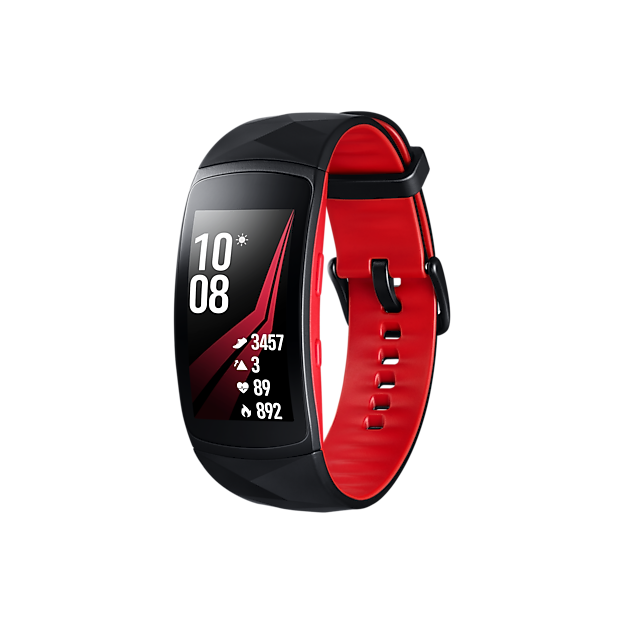
Are you curious if your Samsung Gear Sport watch can help you understand your sleep better? Sleep tracking is more than just numbers—it’s about improving how you feel every day.
If you want to know whether your Gear Sport can keep an eye on your sleep patterns and give you useful insights, this article is for you. Keep reading to discover how this watch works with your sleep and what it means for your health and well-being.
Samsung Gear Sport Sleep Tracking Features
The Samsung Gear Sport offers several sleep tracking features that help users understand their sleep patterns. It monitors sleep automatically and provides insights to improve rest quality. The watch collects detailed data using built-in sensors and presents it in an easy-to-read format.
Sleep Monitoring Capabilities
The Gear Sport tracks sleep stages including light, deep, and REM sleep. It records total sleep time and detects periods of wakefulness. The watch also measures sleep consistency by comparing your sleep across multiple nights. Users receive daily and weekly summaries to track sleep trends over time.
Sensors Used For Sleep Tracking
The watch uses multiple sensors to track sleep accurately. A heart rate sensor measures your pulse throughout the night. An accelerometer detects movement and body position. These sensors work together to determine when you fall asleep and wake up, plus identify different sleep stages.
Types Of Sleep Data Collected
- Total sleep duration
- Time spent in light, deep, and REM sleep
- Number and length of awake periods
- Heart rate during sleep
- Sleep quality score based on collected data
This data helps users identify sleep problems and adjust habits for better rest. The Gear Sport’s sleep tracking offers valuable insights to support healthier sleep routines.
Setting Up Sleep Tracking On Gear Sport
Setting up sleep tracking on the Samsung Gear Sport is simple and helps you monitor your rest effectively. The watch records your sleep patterns automatically, but some settings improve accuracy. Adjusting these options ensures the Gear Sport tracks your sleep data reliably every night.
Enabling Sleep Mode
Start by turning on Sleep Mode on your Gear Sport. This mode reduces screen brightness and limits notifications to avoid interruptions. To enable it, swipe down on the watch face and tap the Sleep Mode icon. The watch will then switch to a quiet, low-light setting during your sleep hours.
Configuring Sleep Goals
Set your sleep goals to match your desired rest time. Open the Samsung Health app on your watch, find the Sleep section, and enter your target sleep hours. Clear goals help the watch analyze your sleep quality against your personal needs. You can update these goals anytime based on your habits.
Syncing With Samsung Health App
For detailed sleep data, sync your Gear Sport with the Samsung Health app on your phone. Connect via Bluetooth and open the app to view sleep reports. The app shows sleep stages, duration, and patterns over days or weeks. Regular syncing keeps your sleep insights up to date and easy to track.
Analyzing Sleep Data
Analyzing sleep data is key to understanding your rest with the Samsung Gear Sport Watch. The watch collects detailed information while you sleep. This data helps you see how well you recover each night. Knowing your sleep habits supports better health decisions.
Interpreting Sleep Stages
The Gear Sport breaks sleep into stages: light, deep, and REM. Each stage plays a role in rest and recovery. Light sleep helps your body relax. Deep sleep is vital for healing and energy. REM sleep supports memory and mood. The watch shows how long you spend in each stage. This helps you know if your sleep is balanced.
Tracking Sleep Patterns Over Time
The watch saves sleep data daily. This lets you view trends over weeks or months. You can spot changes in sleep duration or quality. Patterns may reveal habits affecting rest. For example, late nights or stress can lower sleep quality. Watching these trends encourages better sleep routines.
Identifying Sleep Quality Indicators
Several signs point to good or poor sleep. The Gear Sport measures:
- Total sleep time
- Time awake during the night
- Heart rate changes
- Movement or restlessness
High restlessness or frequent waking means lower sleep quality. A steady heart rate and longer deep sleep suggest better rest. These indicators help you improve sleep habits step by step.

Credit: www.amazon.com
Accuracy Of Gear Sport Sleep Tracking
The Samsung Gear Sport Watch offers sleep tracking features to its users. But how accurate is it? The accuracy of sleep tracking plays a vital role in understanding your sleep patterns. With reliable data, users can improve their sleep quality. This section explores how well the Gear Sport tracks sleep.
Comparison With Other Devices
Many smartwatches offer sleep tracking, but do they all perform equally? The Gear Sport competes with popular brands like Fitbit and Apple Watch. In terms of accuracy, it holds its own. Many users find its data aligns closely with other high-end trackers. Yet, variations exist, depending on individual use and conditions.
Factors Affecting Accuracy
Several factors can influence the accuracy of sleep tracking. Wearing the watch snugly is crucial for accurate readings. The environment also impacts results. A noisy room might affect sleep tracking. Individual sleep patterns can also lead to data differences.
User Feedback And Reviews
Feedback from users provides valuable insights into the Gear Sport’s performance. Many users appreciate its detailed sleep analysis. Some users report minor discrepancies in sleep stages. Overall, most find the sleep tracking reliable for daily use. Online reviews highlight both strengths and areas for improvement.
Tips To Improve Sleep Tracking Results
Improving sleep tracking accuracy with the Samsung Gear Sport Watch takes simple, mindful steps. These steps help the watch gather better data, giving clearer insights into your sleep patterns.
Wearing The Watch Correctly
Wear the watch snugly on your wrist without feeling tight. The sensor must touch your skin at all times. Avoid wearing it too loose or too high on the wrist. Keep the watch clean to ensure accurate readings.
Maintaining Consistent Sleep Schedule
Go to bed and wake up around the same time every day. A regular schedule helps the watch recognize your sleep phases better. Try to avoid naps or irregular sleep times. Consistency improves the quality of data collected.
Regular Software Updates
Keep your Samsung Gear Sport Watch updated with the latest software. Updates often fix bugs and improve sensor accuracy. Check for updates through the Galaxy Wearable app regularly. Updated software ensures the best tracking performance.

Credit: www.amazon.com
Additional Health Features Related To Sleep
The Samsung Gear Sport Watch offers more than just basic sleep tracking. It includes several additional health features that can help you understand and improve your sleep quality. These tools work together to provide a fuller picture of your nighttime rest and overall wellness.
Heart Rate Monitoring
Your heart rate is a key indicator of how well you’re sleeping. The Gear Sport continuously tracks your heart rate throughout the night, giving you detailed insights into your sleep stages, like deep sleep and REM.
Knowing your heart rate patterns can highlight potential issues such as restless sleep or episodes of waking up. Have you ever noticed your heart racing during the night without knowing why? This watch helps uncover those hidden moments.
Stress Management Tools
Stress can seriously affect your ability to fall asleep and stay asleep. The Gear Sport includes stress management features that measure your stress levels by analyzing heart rate variability.
With guided breathing exercises available right on your wrist, you can lower your stress before bedtime. This simple practice might be the difference between tossing and turning or enjoying a peaceful night’s rest.
Activity Tracking Impact On Sleep
How active you are during the day directly affects your sleep quality. The Gear Sport tracks your daily activities, including steps, workouts, and calories burned.
Seeing the connection between your daytime movement and sleep can motivate you to stay active. Have you noticed better sleep on days you move more? This watch makes those patterns easier to spot and act on.
Credit: insights.samsung.com
Frequently Asked Questions
Can Samsung Gear Sport Track Sleep Patterns Accurately?
Yes, Samsung Gear Sport tracks sleep stages like light, deep, and REM sleep. It provides insights to improve your sleep quality.
How Does Gear Sport Monitor My Sleep Quality?
The watch uses built-in sensors to detect movement and heart rate during sleep. It analyzes this data to assess sleep quality effectively.
Can I View Sleep Data On My Phone?
Yes, sleep data syncs with the Samsung Health app. This app shows detailed sleep reports and trends over time for better analysis.
Is Sleep Tracking Automatic Or Manual On Gear Sport?
Sleep tracking is automatic when you wear the watch to bed. It starts recording sleep data without any manual input from you.
Conclusion
The Samsung Gear Sport Watch can track your sleep well. It records different sleep stages like light and deep sleep. This helps you see how well you rest at night. Using this watch, you can find ways to improve your sleep habits.
It offers useful data without being hard to use. A simple tool for better sleep awareness. Consider it if you want to understand your sleep better. Tracking sleep is a helpful step toward healthier living.