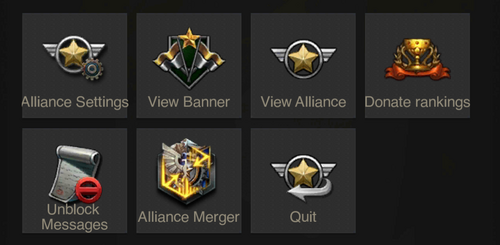
Have you ever blocked someone in Last Shelter Survival and later wished you hadn’t? Maybe you changed your mind or need to team up again.
Unblocking a player can open doors to new alliances and better gameplay. If you’re wondering how to do it quickly and easily, you’re in the right place. Keep reading, and you’ll learn the simple steps to unblock someone and get back to building your empire without any hassle.
Reasons To Unblock Players
Knowing why you might want to unblock someone in Last Shelter Survival can change how you approach the game. Sometimes, blocking feels like the best option to keep your gaming experience smooth. But unblocking can open new doors and improve your gameplay in unexpected ways.
Common Causes For Blocking
Players often block others due to conflicts during raids or disagreements over alliances. You might have blocked someone who was spamming chat or causing distractions. Sometimes, blocking happens because of misunderstandings or accidental actions that escalated quickly.
Have you ever blocked a player and later realized it was a hasty decision? It’s common to react emotionally in the heat of battle, but this can limit your options later. Reflecting on why you blocked someone helps you decide if unblocking is worth it.
Benefits Of Unblocking
Unblocking can restore valuable communication channels with other players. This can lead to better coordination in battles and resource sharing. It also gives you a chance to rebuild alliances and turn former rivals into allies.
Imagine receiving help in a tough war situation from someone you previously blocked. That’s a real benefit of unblocking. It can make your gameplay more dynamic and less isolated.
Are you ready to improve your strategy by reconnecting with players you once blocked? Sometimes, the best gains come from second chances in the game.
Accessing Blocked List
Accessing the blocked list in Last Shelter Survival helps you manage players you have blocked. This list stores all the users you have restricted from interacting with you. Checking this list allows you to review and change these settings easily. It also helps maintain better control over your gameplay experience.
Navigating To Settings
Open the game and go to the main menu. Look for the gear icon, which represents settings. Tap the icon to enter the settings menu. This section contains all your game preferences and controls.
Finding The Blocked Players Section
Inside settings, scroll to find the social or privacy tab. Here, you will see the option for blocked players. Select this option to view the list of blocked users. From here, you can manage who stays blocked or can be unblocked.
Steps To Unblock
Unblocking someone in Last Shelter Survival can change the dynamic of your gameplay instantly. Whether you’ve mistakenly blocked a helpful ally or need to reconnect with a player who once had your back, the process is straightforward. Let’s walk through the clear steps to unblock a player and restore communication.
Selecting The Player
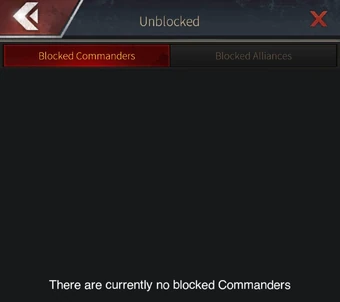
Start by opening your game menu and navigating to the blocked list. This list shows all the players you have previously blocked, making it easy to find who you want to unblock. Scroll through and locate the player’s name carefully—unblocking the wrong person could cause unnecessary issues.
Think about why you blocked them initially. Is it worth reconnecting? Sometimes, seeing their name again reminds you of important alliances or rivalries that could impact your next move.
Confirming Unblock Action
Once you select the player, the game will prompt you to confirm your decision to unblock. This confirmation step is crucial to avoid accidental unblocking. Take a moment to consider if you are ready to re-establish contact.
After confirmation, the player will be removed from your blocked list, allowing messages and invites to come through again. Have you ever hesitated before confirming an action like this, only to realize later it was the right choice? This small pause helps ensure you control your social circle effectively.
Credit: lss.fandom.com
After Unblocking
After unblocking someone on Last Shelter Survival, the next phase focuses on rebuilding your in-game relationship. This step helps bring back the flow of communication and teamwork. It allows both players to move past previous conflicts and work together again. Here’s what happens after unblocking and how to make the most of it.
Restoring Communication
Unblocking reopens the chat window between you and the other player. You can send messages and share strategies once again. Clear and respectful communication helps avoid future misunderstandings. Use this chance to restart conversations calmly. This leads to better teamwork and mutual support.
Rejoining Alliances Or Teams
Being unblocked often means you can rejoin the same alliance or team. Cooperation improves your chances of winning battles. Share resources and plan attacks together. Trust builds stronger bonds within the group. Make sure to participate actively and contribute to team goals. This strengthens your position in the game.
Troubleshooting Unblock Issues
Unblocking someone on Last Shelter Survival should be straightforward, but sometimes you might hit a snag. These issues can be frustrating, especially when you’re eager to reconnect or continue gameplay smoothly. Understanding common problems and knowing when to seek help can save you time and keep your game experience enjoyable.
Common Problems And Fixes
Sometimes, you may find that the unblock option isn’t working as expected. This could be due to temporary glitches in the game or network connectivity issues on your end.
- Blocked User Still Appears:Try restarting the app or logging out and back in. This simple action often refreshes the game’s data.
- Unblock Button Not Responding:Check if your game is updated to the latest version. Older versions can have bugs that prevent some features from working.
- Network Problems:A slow or unstable internet connection may interrupt the unblock process. Switch to a stronger Wi-Fi or mobile data network and try again.
Have you ever tried unblocking someone only to realize that your game needed a quick update? Such small fixes can make a big difference.
When To Contact Support
If you’ve tried the common fixes and still can’t unblock someone, it’s time to get help from Last Shelter Survival’s support team. Persistent issues may point to account-specific problems or bugs that only the developers can resolve.
Reach out if:
- The unblock feature remains broken after updates and restarts.
- You receive error messages when attempting to unblock.
- The blocked player’s profile doesn’t update despite your efforts.
Keep your account details handy when contacting support. Clear communication helps them understand your problem faster and provide a quicker solution.
Credit: lss.fandom.com
Credit: lss.fandom.com
Frequently Asked Questions
How To Find Blocked Players In Last Shelter Survival?
Go to the game’s settings and open the “Blocked List” section. There, you can view all blocked players easily.
Can I Unblock Someone Instantly In Last Shelter Survival?
Yes, you can unblock someone instantly by selecting their name in the blocked list and tapping “Unblock. ”
Does Unblocking Restore Previous Chat History In Last Shelter Survival?
No, unblocking a player does not restore past chat history. You can only communicate from that point onward.
Will Unblocking Affect Alliance Or Friend Status?
Unblocking removes restrictions but does not automatically restore alliance or friend status. You must re-add or rejoin manually.
Conclusion
Unblocking someone on Last Shelter Survival is easy and quick. Just follow the simple steps shared here. You can reconnect with friends or allies without stress. This helps you enjoy the game better and build stronger teams. Remember to check your block list often.
Keep your game experience smooth and friendly. Try it now and see the difference.


